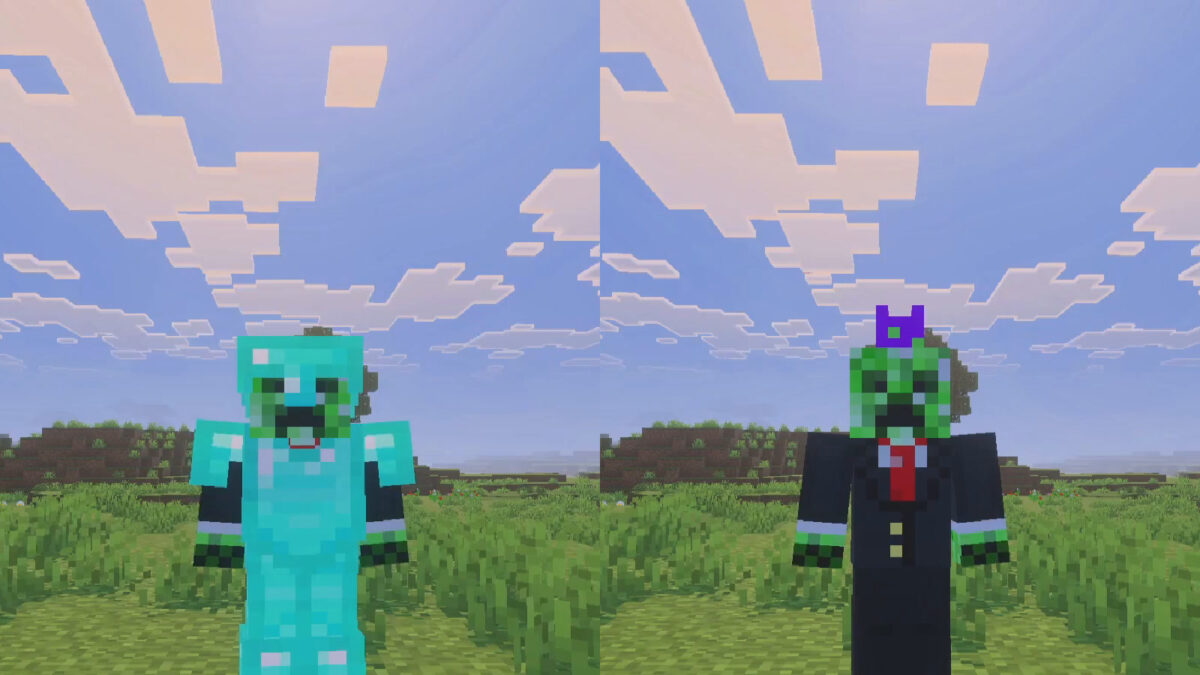
Minecraft is finally letting you hide your armor. The latest Bedrock Beta and Preview, version 26.70.24, adds an Invisible Armor setting. Flip it on and an eye button in your inventory hides your equipped armor, so your skin shows while you keep the protection. There is one catch: hidden armor reappears for 5 seconds every time you take damage.
Mojang listed the feature in the 26.70.24 changelog today, and players have asked for it for years. A clip on r/Minecraft showing it in action passed 700 upvotes within hours.
Turn it on in world settings, then use the eye button
Invisible Armor is a world setting, so it works in existing worlds as well as new ones. For an existing world, turn it on in the world settings. For a new world, it sits in the Advanced tab during creation. Once it is enabled, the eye button in the inventory shows or hides everything you have equipped.
Mojang also added an invisibleArmor game rule, so server and map makers can control it with commands.
Elytra, mob heads and carved pumpkins always stay visible
Not everything disappears. Elytra, mob heads and carved pumpkins stay visible even with armor hidden. The 5-second flash on damage means opponents can still see what you are wearing once a fight starts.
It hides all your armor or none, and it’s Bedrock only for now
The toggle covers all of your armor at once. The most upvoted reply in the Reddit thread asks for a way to hide just the helmet, and other players want an armor icon or number next to player names so PvP stays readable.
The setting is only in the Bedrock Beta and Preview for now, which runs on Xbox, PlayStation, Windows and iOS. Mojang hasn’t said when it will reach the full Bedrock release, and Java Edition doesn’t have it yet. Preview builds are works in progress, so the feature could still change before it ships, and Mojang is taking feedback on it.
You Can Now Hide Your Armor in the Latest Minecraft Preview!
byu/Just-Guarantee7808 inMinecraft